
The UPSC EPFO APFC exam requires candidates to follow specific instructions while filling in the OMR answer sheet and Scannable Attendance List (SAL). Even a mistake in the roll number or Test Booklet Series Code can put the answer sheet at risk of rejection. Candidates must use a black ballpoint pen, enter the required details correctly, and mark their answers carefully. In this blog, we have explained the official UPSC EPFO APFC OMR Sheet Filling Process, common mistakes, negative marking, and important exam-day instructions based on the UPSC notification.
What are the UPSC EPFO APFC OMR sheet filling rules?
The UPSC EPFO APFC notification clearly explains how candidates must write their details and mark their responses on the OMR sheet. Since the answer sheets are evaluated using computerised machines, candidates must fill in the required boxes and darken the correct circles carefully. The roll number, subject code, and test booklet series must match the examination details. Candidates should also check the question booklet for missing or damaged pages before starting the test.
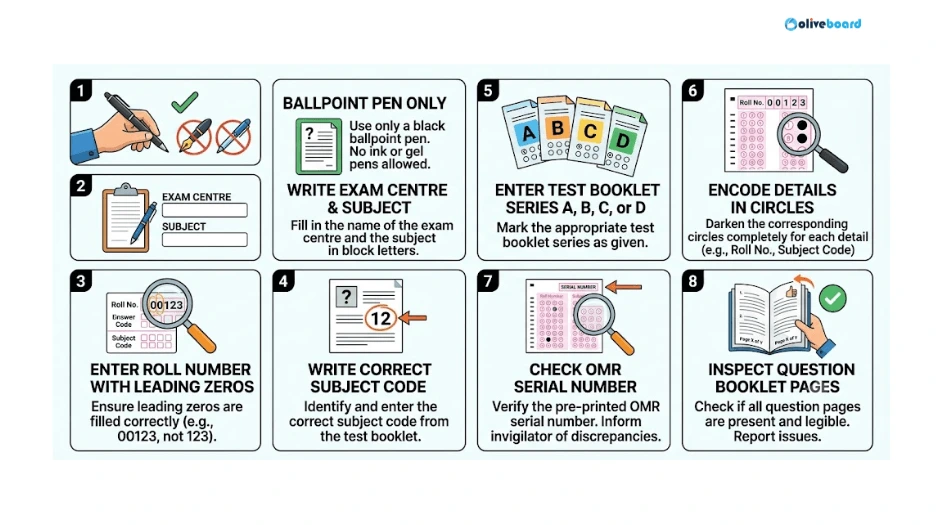
- Use a black ballpoint pen only: Use it for writing details and marking answers. Pencils and ink pens are not permitted.
- Write the examination centre and subject: Enter the centre name and subject in the designated spaces in English or Hindi.
- Enter the roll number: Write the roll number exactly as printed on the e-admit card, including any leading zeros.
- Write the subject code: Check the applicable examination instructions and enter the correct code.
- Enter the test booklet series: Confirm whether the question booklet is Series A, B, C, or D.
- Encode the details: Darken the corresponding circles for the booklet series, subject code, and roll number.
- Check the answer sheet serial number: If the sheet is unnumbered, report it to the invigilator immediately.
- Check the question booklet: Request a replacement of the same series and subject if it has torn, missing, or unprinted pages.
How should you fill in the roll number and test booklet series?
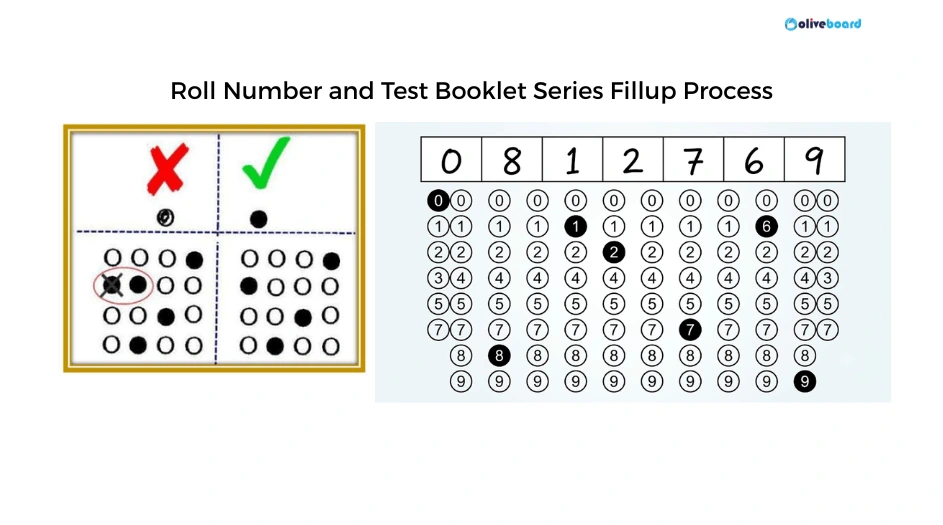
Candidates must write their roll number in the boxes provided on the OMR answer sheet and then encode each digit in the corresponding circle column. The written number and shaded circles must match the e-admit card exactly. The same process applies to the subject code and test booklet series. UPSC warns that errors or discrepancies in these details can make the answer sheet liable for rejection.
What are the common OMR sheet filling mistakes candidates should avoid?
Candidates should pay special attention to the details that can affect the identification and evaluation of their answer sheets. UPSC specifically warns about mistakes in the roll number and Test Booklet Series Code. Incomplete shading, incorrect subject codes, and unauthorised markings can also create problems. Candidates should follow the instructions printed on the answer sheet and question booklet instead of relying on assumptions.
| Common mistake | Correct approach |
|---|---|
| Using a pencil or ink pen | Use a black ballpoint pen only. |
| Writing the wrong roll number | Copy it exactly from the e-admit card. |
| Omitting leading zeros | Write and encode every digit, including zeros at the beginning. |
| Entering the wrong booklet series | Check the series printed on the question booklet. |
| Encoding the wrong subject code | Verify the code against the applicable examination instructions. |
| Shading the wrong circle | Match each circle with the correct digit or option. |
| Leaving circles partially shaded | Completely blacken the selected circle. |
| Marking multiple answers | Select only one response for each question. |
| Writing unnecessary information | Enter only the details requested by UPSC. |
| Folding or damaging the answer sheet | Keep the sheet flat and free from unauthorised marks. |
| Ignoring a defective question booklet | Inform the invigilator and request a replacement. |
| Making an unauthorised roll number correction | Follow the official correction procedure. |
How should you mark answers on the UPSC EPFO APFC OMR sheet?
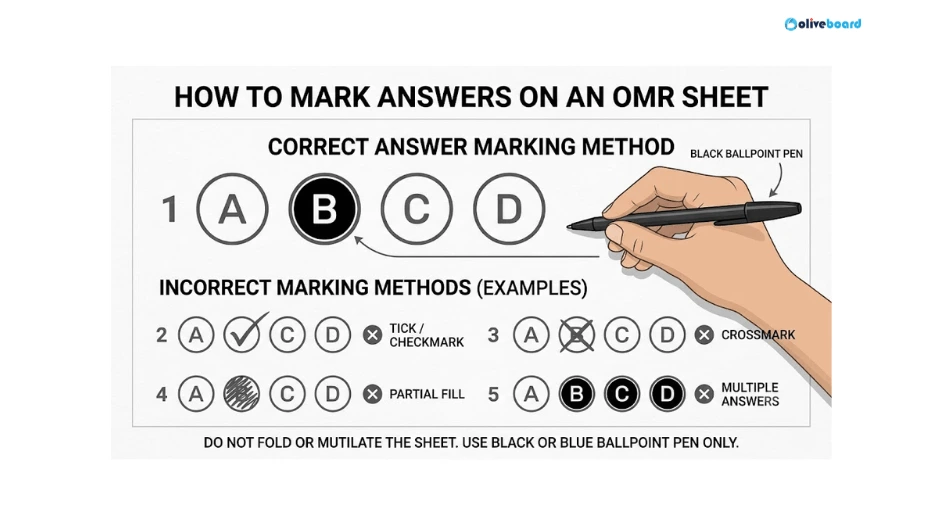
In the objective-type exam, candidates must choose one response from the four options given for each question. The selected option must be marked by completely blackening the corresponding circle with a black ballpoint pen. Candidates should avoid shading more than one option because multiple responses are treated as incorrect. They should also remember that unanswered questions do not attract negative marking under the instructions provided.
- Read the question and all four options before selecting a response.
- Mark only one option: (a), (b), (c), or (d).
- Completely darken the circle corresponding to your chosen answer.
- Do not use a pencil or ink pen to mark the response.
- Do not make unnecessary marks on the answer sheet.
- Check the question number before marking the answer to avoid marking a response against the wrong question.
What are the negative marking rules in the UPSC EPFO APFC exam?
The notification states that negative marking applies to wrong answers in objective-type question papers. One-third of the marks assigned to a question is deducted for each incorrect response. If a candidate marks more than one option, the answer is treated as incorrect even if one of the selected options is correct. No marks are deducted for a question that is left unanswered.
| Response type | Negative marking rule |
|---|---|
| Correct answer | No penalty |
| Incorrect answer | Deduction of one-third of the marks assigned to the question |
| More than one option marked | Treated as incorrect and penalised |
| Question left unanswered | No penalty |
Candidates should therefore read each question carefully and avoid marking multiple options.
How should you fill in the Scannable Attendance List (SAL)?
The Scannable Attendance List is separate from the OMR answer sheet and must also be completed carefully. Candidates must use a black ballpoint pen to enter the required details in the relevant columns. The booklet series and answer sheet serial number must be recorded accurately, and candidates must sign in the designated space. Missing or incorrect entries should be addressed according to the invigilator’s instructions.
- Darken the circle for Present under the Present/Absent column.
- Darken the circle corresponding to the test booklet series.
- Write the test booklet serial number.
- Write the answer sheet serial number and darken the matching circles below it.
- Sign in the appropriate column.
Which items are allowed inside the UPSC EPFO APFC exam hall?
As per the UPSC EPFO APFC Notification PDF candidates may carry a clipboard or hardboard with nothing written on it and a good-quality black ballpoint pen. The invigilator will provide the answer sheet and rough-work sheet. Candidates should not bring prohibited materials or electronic communication devices into the examination premises. They should also avoid carrying valuable items because secure storage may not be available.
| Permitted items | Items not permitted under the cited instructions |
|---|---|
| Clipboard or plain hardboard | Books, notes, and loose sheets |
| Good-quality black ballpoint pen | Calculators and mathematical or drawing instruments |
| Answer sheet supplied by the invigilator | Log tables, slide rules, and map stencils |
| Rough-work sheet supplied by the invigilator | Test booklets or rough sheets from earlier sessions |
| — | Mobile phones, pagers, Bluetooth devices, and other communication devices |
What should you do if you make a mistake on the OMR sheet?
Candidates should not make unauthorised corrections to important details on the answer sheet. The notification specifically states that any correction or change in the written roll number must be initialled by both the candidate and the invigilator and countersigned by the supervisor. If the question booklet is missing its series, the answer sheet is unnumbered, or the booklet has damaged or missing pages, candidates should inform the invigilator immediately.
- Wrong written roll number: Inform the invigilator and follow the prescribed correction procedure.
- Missing booklet series: Report the issue and request the required replacement.
- Unnumbered answer sheet: Ask the invigilator for a numbered answer sheet.
- Torn or missing pages: Request a complete question booklet of the same series and subject.
- Other OMR errors: Do not assume that erasing or overwriting is allowed; seek instructions from the examination staff.
FAQs
Candidates must use a black ballpoint pen for writing details and marking answers.
No, the instructions require a black ballpoint pen and do not permit pencils.
Yes, UPSC states that errors or discrepancies in the roll number can make the answer sheet liable for rejection.
The response is treated as incorrect and attracts the applicable negative marking.
The candidate should inform the invigilator immediately and request a complete booklet of the same series and subject.
- UPSC EPFO Principles of Accountancy, Auditing and Insurance Syllabus 2026
- UPSC EPFO Labour Laws Syllabus 2026 for APFC: Topic-Wise Details
- UPSC EPFO APFC Exam Centre List, City Allocation & Exam-Day Rules
- UPSC EPFO APFC OMR Sheet Filling Rules and Common Mistakes
- UPSC EPFO PYPs, Download EPFO Previous Year Question Papers
- UPSC EPFO APFC Study Material 2026, Download Free Notes

Hi, I’m Aditi. I work as a Content Writer at Oliveboard, where I have been simplifying exam-related content for the past 4 years. I create clear and easy-to-understand guides for JAIIB, CAIIB, and UGC exams. My work includes breaking down notifications, admit cards, and exam updates, as well as preparing study plans and subject-wise strategies.
My goal is to support working professionals in managing their exam preparation alongside a full-time job and to help them achieve career growth.